Compare Text
Paste or upload text files to compare differences at the line and character level.
Identify added, removed, and modified text in a side-by-side view.
Comparison results will appear here after clicking Compare.
Compare Two Texts
PasteCompare is a free online text comparison tool for documents, code, contracts, articles, and AI-generated content. It highlights differences in a clear side-by-side view so you can see every change - including added, deleted, edited, and moved lines.
Paste Your Texts
Past or upload two texts, original into the left panel and the updated version into the right.
Click Compare
Press Compare and results appear in under a second. Prefer live feedback? Turn on real-time mode and see differences update as you type.
Read the Results
Every change gets a color - green for new lines, red for deleted ones, blue for content that shifted to a different position. Nothing to decode, everything is visible at a glance.
Comparison Interface
The Changes Map gives you a quick overview of all changes, helping you navigate through them easily. Click any section to jump straight to the change.
See both versions of your text side by side and read them in parallel without losing context. The panels stay in sync as you scroll, so you're always looking at the same position in both.
- Synchronized scrolling across both panels
- Line numbers for precise navigation
- Changes Map for full-document overview and navigation
- Inline word-level highlights within changed lines
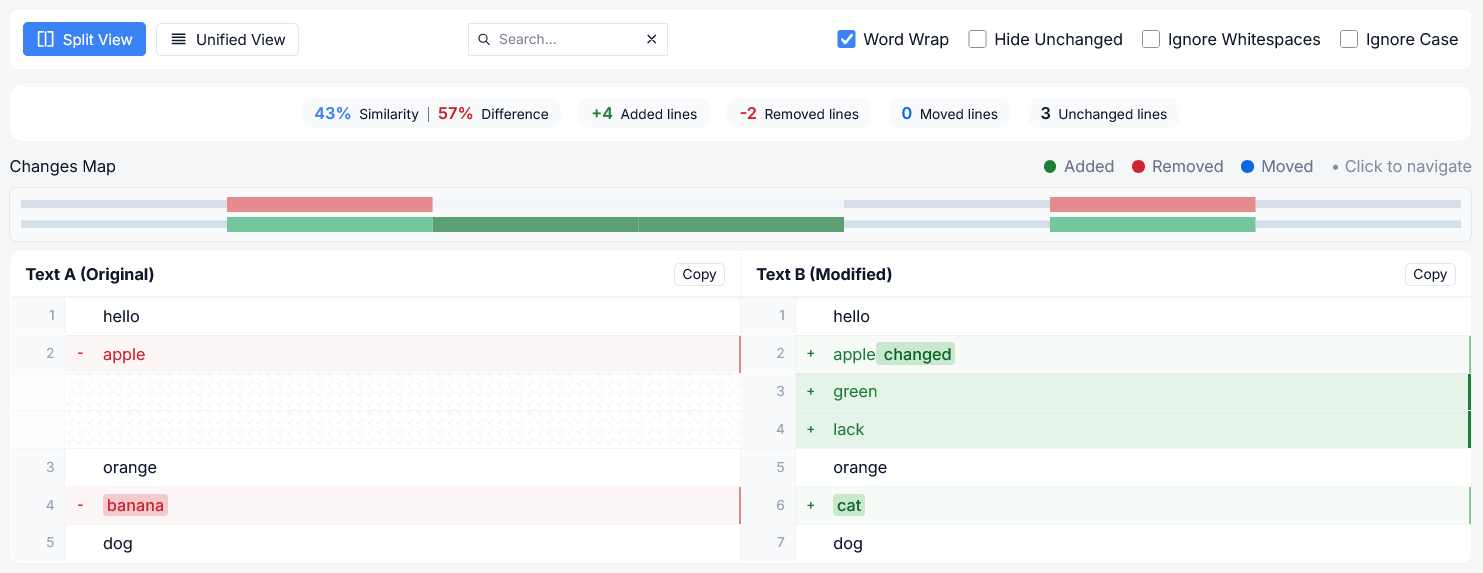 Comparison Overview
Similarity Score & Change Breakdown
Before you read a single line, PasteCompare shows how similar the two texts are as a percentage, along with a precise breakdown of every detected change.
Moved lines appear in blue - separate from deletions, because a paragraph that shifted position is not the same as one that was removed entirely.
- Overall similarity & difference percentage
- + Lines added
- − Lines removed
- ↕ Lines moved - same content, different position
- Unchanged lines
 Comparison stats
View Modes, Search & Smart Filters
Not every comparison needs the same layout. Switch to Unified View for a single continuous stream where additions and deletions appear inline with surrounding context - perfect when you want the full picture in one column instead of two.
Need to find something fast? Use the search box to jump directly to any word or change - matching results are highlighted in yellow so you can instantly spot what you’re looking for.
- Hide Unchanged - show only lines with changes
- Ignore Whitespace - ignore indentation and spacing differences
- Ignore Case - compare text without case sensitivity
- Word Wrap - keep long lines visible without horizontal scrolling
- Real-time mode - automatically refreshes results as you make changes
 View Modes, Search & Filters
Supported File & Text Types
Supports a wide range of formats for upload or paste:
Who Is PasteCompare For?
Writers & Editors
Identify all changes between two different copies of your work, including any accidental deletions that are impossible to notice in a normal read-through.
Developers
Compare pieces of code or configurations or even API calls, without launching an integrated development environment or running a git command.
Researchers & Students
Ensure your edits on an essay or thesis have not inadvertently moved or changed anything other than the parts you meant to change.
AI Content Rewriters
Copy and paste the original version next to the AI-generated content to compare how much of the original was used.
Legal Experts & Contract Writers
Instantly identify all the changes made to the clauses in two different versions of the same contract without having to go through each word yourself.
Translators
Compare two versions by placing the original and the translated content side by side for easy verification.
FAQ
Is PasteCompare free to use?
Completely free - no account needed, no usage limits, and no hidden tiers.
Is my text stored anywhere?
No. We don't see, collect, or store anything you paste. PasteCompare runs entirely in your browser, so all comparisons happen locally on your device.
What can I compare with PasteCompare?
Any plain-text content - from articles and contracts to emails, code, data exports, and configuration files. See the section above for a complete list of supported file and text types.
Can I compare large documents?
Yes. PasteCompare is designed to handle everything from short paragraphs to lengthy documents and source code files. Performance depends on your browser and device, but most comparisons complete instantly.
How accurate is PasteCompare?
Highly accurate - but not a single comparison tool manages to get everything exactly right 100%. Odd formatting or line endings may occasionally mess up the analysis. Please feel free to tell us about any issues you notice.